
What is the Annotation Bank?
The Annotation Bank lets you save your favorite annotations into a handy folder to use time and time again. Simply add them to the bank, then drag and drop them onto any future documents.
Annotation types that can be stored in the Annotation Bank:
How to use the Annotation Bank
Storing Annotations
Annotations that can be saved to the Annotation Bank will have the Annotation Bank button in their action bar when selecting the annotation.
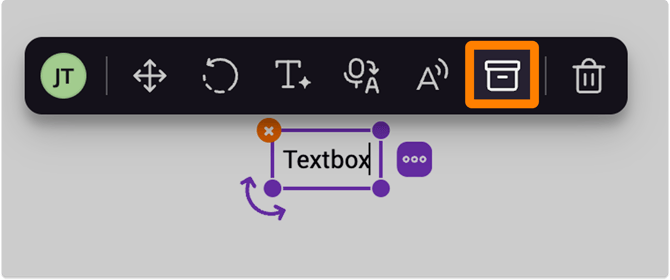
For Comment tool annotations, you can also select the Add to annotation bank button inside the comment options drop-down.
%20(2)-png-May-15-2026-04-09-40-9154-AM.png?width=670&height=411&name=Screenshot%20Template%20(Insert%20image)%20(2)-png-May-15-2026-04-09-40-9154-AM.png)
Accessing the Annotation Bank
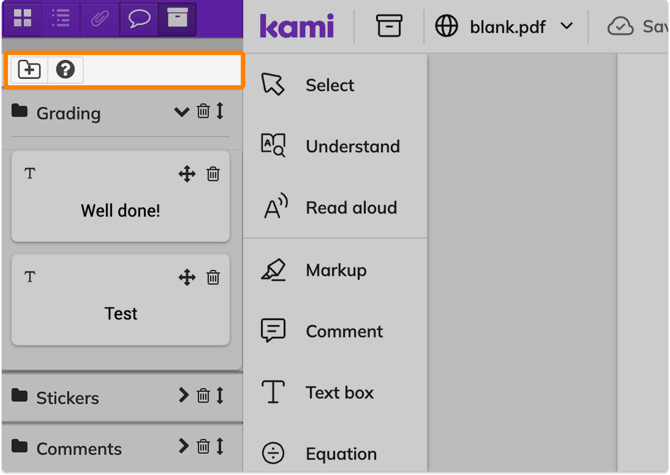
The Annotation Bank button is located on the left end of the Navigation bar. Simply click the icon to open the Annotation Bank sidebar, where you can see your saved annotations, organize them into folders, and add them to your current page.
%20(3)-png-May-15-2026-04-14-26-0748-AM.png?width=670&height=390&name=Screenshot%20Template%20(Insert%20image)%20(3)-png-May-15-2026-04-14-26-0748-AM.png)
Deleting and restoring annotations
After deleting an annotation, a message will appear stating that it will be stored for 1 hour before being permanently deleted. To restore an annotation before it is permanently deleted, select the circular arrow icon.
%20(5)-png-May-15-2026-04-18-34-9909-AM.png?width=670&height=477&name=Screenshot%20Template%20(Insert%20image)%20(5)-png-May-15-2026-04-18-34-9909-AM.png)
Inserting your stored annotations into a document
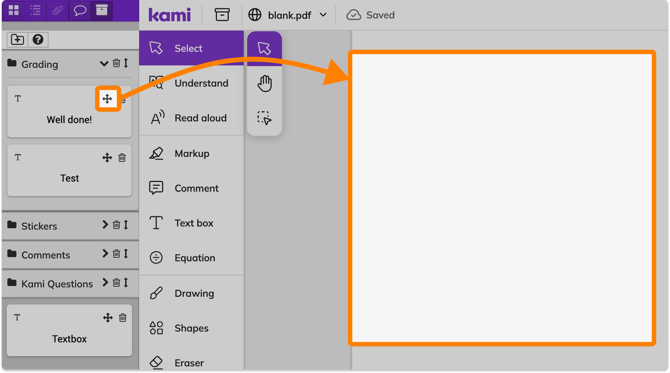
Simply drag and drop an annotation anywhere on your Kami document straight from the Annotation Bank.
💡 Stored Comment annotations can be edited directly in your annotation bank via the edit (✎) button. You can also edit the labels of Audio, Video, and Screen Capture comments.