
Who is this for?
✓ Students and Teachers.
✓ Schools or districts with the Kami app installed in MyLogin.
If the Kami app is not yet installed in MyLogin, please contact your MyLogin admin to request it be added. They can find the Kami app in the MyLogin app directory.
How to access Kami through MyLogin
1. Find Kami from the MyLogin portal
For Teachers:
Log in to your MyLogin dashboard. Your MyLogin admin should have installed the Kami app here. Select the Kami app. This will open the Kami app in a new browser tab.
Can't see the Kami app here? Please contact your MyLogin admin (usually one of your Tech admins) and ask them to add Kami to your district's MyLogin dashboard. They can find the Kami app in the MyLogin app directory.
For Students:
Once you log into MyLogin, you should see all your app tiles on your MyLogin dashboard. Find and select the Kami app tile.
2. Link your Google or Microsoft account
If this is your first time doing this step, you will be prompted to log in with your Kami Google or Microsoft account. This will create a new Kami account linked to the entered Google or Microsoft account, and will also be linked to your MyLogin account.
If you already have a Kami account, this step is similar to when you normally log in to the Kami app. The only difference is that this step will add a link to your MyLogin account.
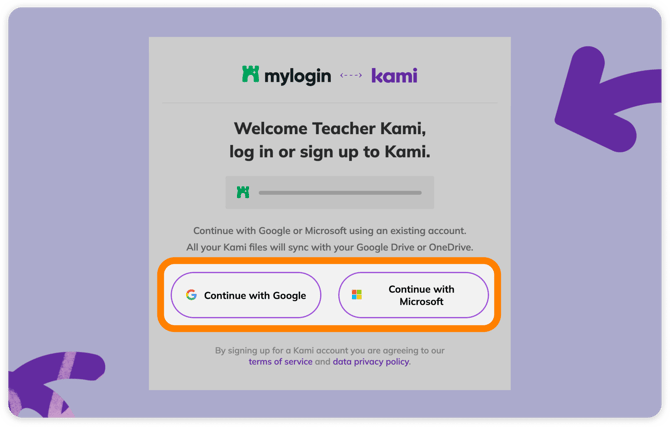
Once you link your MyLogin account to a Kami account, you won't be able to link it to any other accounts. If you need to unlink, please contact our support team.
3. Allow permission to Kami
When first accessing Kami through MyLogin, you will be prompted to review the permissions being granted to Kami. Read through the permissions, then select the Continue button at the bottom of the window.
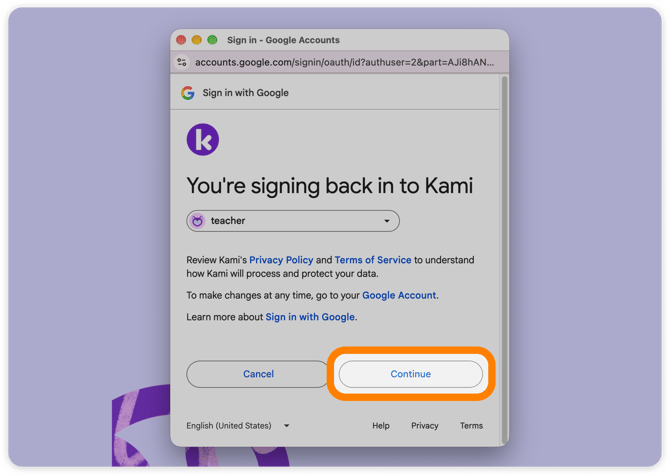
Once you've completed the steps above, your MyLogin account, Google or Microsoft account, and Kami account will be linked. The page will then reload and open the Kami app.
The next time you open the Kami app from Skolon, it will open with the account you linked